
More and more modern cars are equipped with Apple CarPlay, allowing drivers to use smartphone apps directly on their car’s display instead of relying on a traditional built-in car navigation system.
If you are planning to drive the Shikoku Pilgrimage (Ohenro), Apple CarPlay can make getting around much easier.
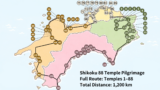
Our website provides Google Maps links to the 88 temples of the Shikoku Pilgrimage, as well as useful locations such as accommodation and other facilities along the pilgrimage route.
By simply tapping a Google Maps link on your iPhone, you can open your destination in Google Maps and use Apple CarPlay to navigate there.
You don’t need to manually enter an address or search for each temple using your car’s navigation system.
In this article, we’ll explain how to use Google Maps links with Apple CarPlay when driving the Shikoku Pilgrimage.
1. What Is Apple CarPlay?
Apple CarPlay allows you to connect your iPhone to your car and use compatible apps on the car’s built-in display.
Google Maps is compatible with Apple CarPlay, so you can view maps and navigation directions on your car’s screen instead of constantly checking your iPhone.
This is especially useful when driving between temples during the Shikoku Pilgrimage.
2. How to Set Your Destination Using Google Maps Links
Using Google Maps links is very simple.
- Open the Google Maps link list on our website using your iPhone.
- Tap the link for the temple or accommodation you want to visit.
- The destination will open in Google Maps.
- Open Google Maps on your car’s Apple CarPlay display.
- Check the destination and route, then start navigation.
That’s it! You can now use Apple CarPlay to navigate to your destination.
Note: The route opened on your iPhone may not always automatically appear on your CarPlay display. If necessary, select or search for the destination again using Google Maps on CarPlay.
3. Benefits of Using Apple CarPlay for the Shikoku Pilgrimage
Using Apple CarPlay makes driving between temples much easier.
You can also use Google Maps links to find accommodation, restaurants, parking areas, and other useful places along your journey.
This is particularly helpful for first-time visitors driving the Shikoku Pilgrimage.
However, Google Maps does not always guide you to the best entrance or the designated parking area for pilgrims. Please check local signs and road conditions, and always drive safely.
Conclusion
Combining Apple CarPlay with Google Maps links is a convenient way to navigate while driving the Shikoku Pilgrimage.
Use our Google Maps link list to make your journey around the 88 temples easier and more enjoyable.
We hope this guide helps you have a wonderful Ohenro experience!
Related Article
Shikoku Pilgrimage by Car: 10-Day Route, Cost & Essential Tips.
Shikoku Pilgrimage by Car


Comments